Do Pinterest Schedulers Hurt Your Reach? The Honest Answer
The “schedulers kill your reach” myth keeps people manually pinning at midnight for no reason. Here’s the honest truth about what actually affects your Pinterest reach — and why the tool isn’t it.


This is the myth that will not die, and it costs people real time: the belief that using a scheduler will tank your Pinterest reach, so you’d better publish everything by hand, live, ideally at some magic hour. I’ve watched creators set alarms to manually post pins at 9pm because they were scared a tool would get them “penalized.” So let me give you the honest, direct answer right up front: no, using a legitimate Pinterest scheduler does not hurt your reach. Pinterest publishes pins through official API partners all day long and treats them exactly like manually posted ones. The tool is not the thing that helps or hurts you — your strategy is. Let’s unpack why the myth exists, what actually affects reach, and how to schedule without hurting a thing.
I want to be careful and fair here, because myths usually have a grain of truth buried in them, and this one does — just not where people think. The confusion comes from conflating the tool with the behavior. A scheduler can make it easy to do reach-killing things (like blasting the same pin to 40 boards), but it doesn’t require them, and the tool itself is neutral. To see why, it helps to understand what’s actually happening when a pin gets auto-published, which I cover in how Pinterest auto-publishing actually works.
Where the myth comes from
The myth has real historical roots. Years ago, some scheduling tools worked in sketchy, unofficial ways (screen-scraping, unofficial access) that Pinterest genuinely didn’t like, and heavy users of certain tools sometimes got flagged. On top of that, the tools of that era made it trivially easy to spam — pin the same image to dozens of boards a day — which was an actual strategy back then and is a reach-killer now. So people (reasonably) connected “I used a scheduler” with “my reach dropped,” when the real culprit was either an unofficial tool or spammy behavior the tool enabled. Fast-forward to today: reputable schedulers use Pinterest’s official API as approved partners, and the spammy tactics they used to encourage are exactly the ones Pinterest now discourages.
The other source of the myth is a very human bias: when something goes wrong, we blame the most recent change. You started using a scheduler, then your numbers dipped (for totally unrelated reasons — a seasonal lull, an algorithm shift, less fresh content), and the scheduler got the blame. But correlation isn’t causation. Pinterest reach fluctuates constantly for reasons that have nothing to do with how a pin was published. Blaming the tool feels satisfying, but it points you away from the things that actually move the needle.
What actually affects your reach
Here’s what genuinely determines your Pinterest reach, none of which is “did a human or a tool click publish.” First, freshness: Pinterest strongly favors new pins, so a steady stream of fresh content gets more distribution than the same pins recycled endlessly — I explain this in fresh pins explained. Second, relevance: keyword-rich titles, descriptions, and boards so Pinterest knows who to show your pin to. Third, engagement: pins people save and click get shown more. Fourth, consistency: accounts that publish regularly get treated as active, reliable sources. Notice that a scheduler helps with every single one of these — especially freshness and consistency.

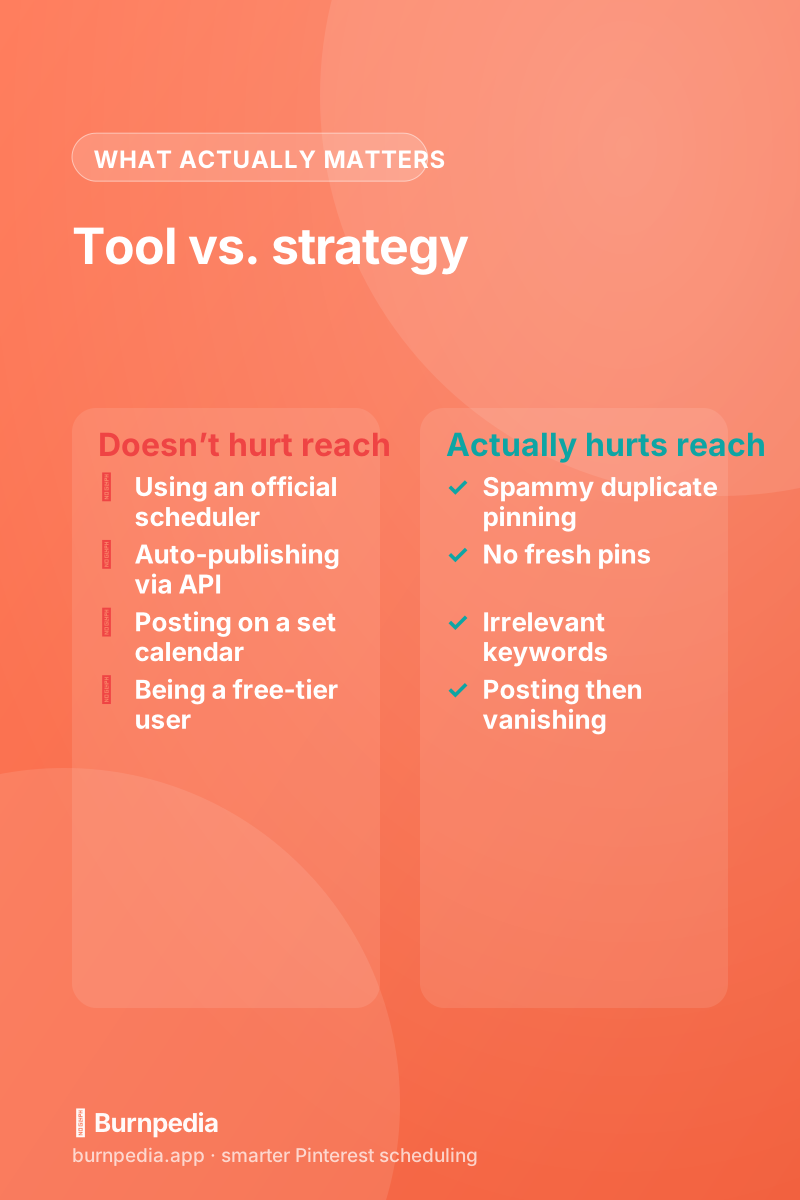
Contrast that with what actually hurts reach: spamming the same pin to many boards in a short window, publishing zero fresh content, stuffing irrelevant keywords, linking to spammy or broken destinations, or posting in a frantic burst and then vanishing for weeks. A scheduler can be used to do the spammy version — but it can just as easily be used to do the healthy version (fresh pins, spaced out, on a steady calendar). The tool is a neutral instrument. Whether it helps or hurts is entirely about how you use it, which is really just the Pinterest algorithm rewarding good behavior and ignoring the delivery mechanism.
Scheduling actually helps your reach
Here’s the part the myth gets exactly backwards: for most people, scheduling improves reach rather than hurting it, because it fixes the number-one reach problem — inconsistency. The single most common reason accounts underperform is that people pin in enthusiastic bursts and then disappear when life gets busy, which reads to Pinterest as an inactive account and starves the freshness signal. A scheduler solves precisely that: you batch your pins when you have energy, and the tool keeps a steady, fresh stream going out even during the weeks you’re slammed. That reliable cadence is exactly what the algorithm rewards. Manual pinning doesn’t give you a reach bonus; it just gives you a much higher chance of falling off the wagon.
There’s also a quality angle. When you schedule, you’re usually planning thoughtfully — writing better titles, choosing better keywords, spacing pins sensibly — instead of dashing off a rushed pin at 11pm because you remembered you “should post something.” Batching tends to produce more deliberate, better-optimized pins, and better pins get more reach. So not only does scheduling not hurt you, the calmer, more intentional workflow it encourages often makes your pins genuinely better.
How to schedule without hurting anything
To keep your reach healthy while scheduling, just follow the same good practices you’d follow manually: use a reputable official-partner tool (not some sketchy unofficial one), publish fresh pins rather than recycling the same image endlessly, write keyword-rich titles and descriptions, space your pins out on a steady calendar instead of dumping them all at once, and send clicks to relevant, quality destinations. Do that and your scheduled pins will reach exactly as well as manual ones — better, in practice, because you’ll actually keep it up.
A quick gut-check if your reach really dropped
If your reach genuinely fell and you’re tempted to blame your scheduler, run an honest gut-check first, because the real cause is almost always elsewhere. Did you slow down on fresh pins, or start recycling the same few images? Did you drift off your keywords, or start linking to a page that loads slowly? Did a big seasonal moment for your niche just pass? Did Pinterest roll out one of its periodic algorithm updates that shuffled everyone’s numbers at once? Any single one of those will move your reach far more than the mechanism you used to click publish ever could.
Test it the simple way: keep using your scheduler, but fix the actual fundamentals — publish fresh, keyword well, stay consistent — and watch what happens over the next month. If reach recovers (it usually does), the scheduler was never the problem. That beats the alternative, which is crawling back to exhausting manual pinning, quietly getting the same or worse results, and never learning what actually moved the needle.
The honest answer
So, do Pinterest schedulers hurt your reach? No. A pin published by a legitimate scheduler reaches exactly like one you posted by hand, because Pinterest cares about your content, freshness, relevance, and consistency — not who or what clicked publish. The myth comes from old unofficial tools and spammy tactics, neither of which describes modern, official-partner scheduling used sensibly. If anything, scheduling helps your reach by making the consistency Pinterest rewards actually achievable. So stop setting alarms to pin manually at magic hours; it’s doing nothing for you except stealing your evenings. Batch, schedule, stay fresh and consistent, and let the algorithm reward the behavior it actually cares about. Your reach will be just fine — probably better. — Sadie
Written by Sadie Brooks
Hey — I’m Sadie. I grew up in a small town outside Columbus, Ohio, moved to Austin for a job I quit within a year, and somewhere in between I started a scrappy little food blog to keep myself sane.
These days I help creators, bloggers, and small U.S. business owners grow on Pinterest without turning it into a second full-time job. I write the Burnpedia blog because I genuinely love this stuff, and because I wish someone had explained it to me in plain English years ago. Pour a coffee, pull up a chair.
Try Burnpedia freeWant Pinterest to run itself?
Every tip on this blog gets easier when your Pins publish on schedule. Burnpedia batches, times, and posts them for you — start free, no credit card.
Try Burnpedia free