How to Turn Your Reels & TikToks Into Pinterest Video Pins
That Reel that died in a day? On Pinterest it can get found for months. Here’s how to repurpose your Reels and TikToks into Pinterest video pins the right way — watermark fix included.


Let me tell you about the most wasteful thing creators do: pour hours into a Reel or TikTok, get a nice little spike of views, and then… let it die forever after 48 hours. Meanwhile Pinterest — a search engine where content gets discovered for months — sits right there, hungry for exactly that kind of short vertical video. Repurposing your existing short-form videos into Pinterest video pins is the single highest-leverage move in video: you already did the hard part (making the video), and now you get to squeeze months of extra life out of it. Here’s how to do it properly, watermark trap and all.
This is really a video-specific version of a principle I love: make once, publish many places. I cover the broader idea in repurposing content for Pinterest, but video deserves its own playbook because there are a couple of specific gotchas — mainly watermarks and captions — that make the difference between a repurposed clip that ranks and one that flops. Let’s walk through it step by step.

Why the same clip behaves so differently here
First, understand why this works, because it shapes how you repurpose. On Instagram and TikTok, a video lives and dies by the feed and the algorithm’s mood that day — big spike, fast death, driven by trends and audio. On Pinterest, the same clip becomes a searchable, evergreen asset that keeps getting found by people typing in what they want. It’s the difference between a firework and a slow-burning candle. That’s also why Pinterest sends traffic so well — I compare the two platforms head-to-head in Pinterest vs. Instagram traffic.
This matters because it changes what you optimize for. On Reels you chase trends and trending audio; on Pinterest you optimize for keywords and clarity. So repurposing isn’t just re-uploading — it’s re-dressing the same clip for a search engine instead of a social feed. Same footage, different costume.
Step 1: Get a clean copy (mind the watermark)
Here’s the number-one mistake: uploading a video with a TikTok or Instagram watermark on it. Pinterest — like every platform — isn’t thrilled about content plastered with a competitor’s logo, and watermarked reposts tend to underperform. So always start from the clean original: save the version you exported before you added it to TikTok/Reels, or use the platform’s own “save without watermark” option where available. If all you have is a watermarked copy, it’s worth re-exporting a clean one. This one habit meaningfully improves how your repurposed videos do.
While you’re at it, check the orientation. Reels and TikToks are usually 9:16, which is great for Pinterest too — but if your clip has platform-specific UI baked in (captions crammed at the bottom where TikTok’s buttons were, for instance), re-crop or re-frame so nothing important is hidden and it reads cleanly as a standalone Pinterest video.
Step 2: Rewrite the caption for search
This is where most of the ranking magic happens. Your TikTok caption — full of trending hashtags, slang, and “wait for it” — is optimized for a social feed, not a search engine. Replace it. Write a clear, keyword-rich Pinterest title and description that say plainly what the video is about, using the words people would actually search. “POV: me at 3am 😭 #fyp” becomes “5-minute no-bake dessert recipe (easy summer treat).” Pinterest reads that text to decide who to show your pin to, so this rewrite is doing real SEO work, not just formatting.
Add a text hook right on the video too, in the first second, since your snappy TikTok on-screen text may not translate. A few big readable words that state the payoff (“Fold a fitted sheet in 10s”) will stop the scroll and make the pin understandable with the sound off — which is how most Pinterest browsing happens.
Step 3: Add your link and a strong cover
Now do the thing you can’t do on TikTok: add a real link. Point the pin at your blog post, product, or landing page so all that lovely evergreen discovery actually drives somewhere useful. This is the whole reason repurposing to Pinterest is so valuable for business — it converts entertainment content into traffic. Pick a strong cover frame with your hook visible, double-check the specs against my video pin specs cheat sheet, and you’ve got a proper Pinterest video pin, not just a re-upload.
A little nuance on links: not every clip needs to hard-sell. Some repurposed videos are best pointed at a helpful blog post (top of funnel), others straight at a product. Match the destination to the video’s intent, the same way you’d choose reach versus traffic for any pin. But the point stands — on Pinterest, that link is your payoff, so don’t leave it empty.
What to repurpose — and what to skip
Not every Reel deserves a second life, so be a little selective. The best candidates are evergreen and useful: how-tos, tutorials, tips, before-and-afters, and demos that make sense any time of year. Those match how people search on Pinterest and will keep getting found for months. Prioritize your clips that teach or show something, because those are exactly what Pinterest users are hunting for.
What to skip: anything that only made sense in a fleeting trend, relies entirely on a trending audio, is heavy on inside jokes or “you had to be there” context, or is time-sensitive to a moment that’s already passed. That content worked on TikTok because the feed rewarded the trend right then; on a search engine with a long memory, it just falls flat. When in doubt, ask “would someone search for this six months from now?” If yes, repurpose it. If no, let it stay where it was.
One more thing on audio, since it trips people up: a lot of short-form video leans hard on a trending song, and that trending audio does nothing for you on Pinterest — nobody’s searching by sound here. Worse, licensed music you grabbed inside TikTok may not be something you want to carry over. So when you repurpose, make sure your video still makes sense with the sound off, and lean on your on-screen text and visuals to carry the message. If a clip only works because of its audio, it’s probably one to skip or re-cut rather than repost as-is.
Step 4: Schedule, don’t dump
Last step, and it’s the one that quietly separates results from noise: don’t upload all your repurposed videos in one giant batch. Space them out. If you’ve got a backlog of thirty old Reels, that’s not one busy afternoon of posting — that’s a month of fresh Pinterest content if you schedule it out. Steady beats spiky here, exactly like it does for everything else on Pinterest. Grab a few video ideas to fill any gaps, and keep a consistent trickle going.
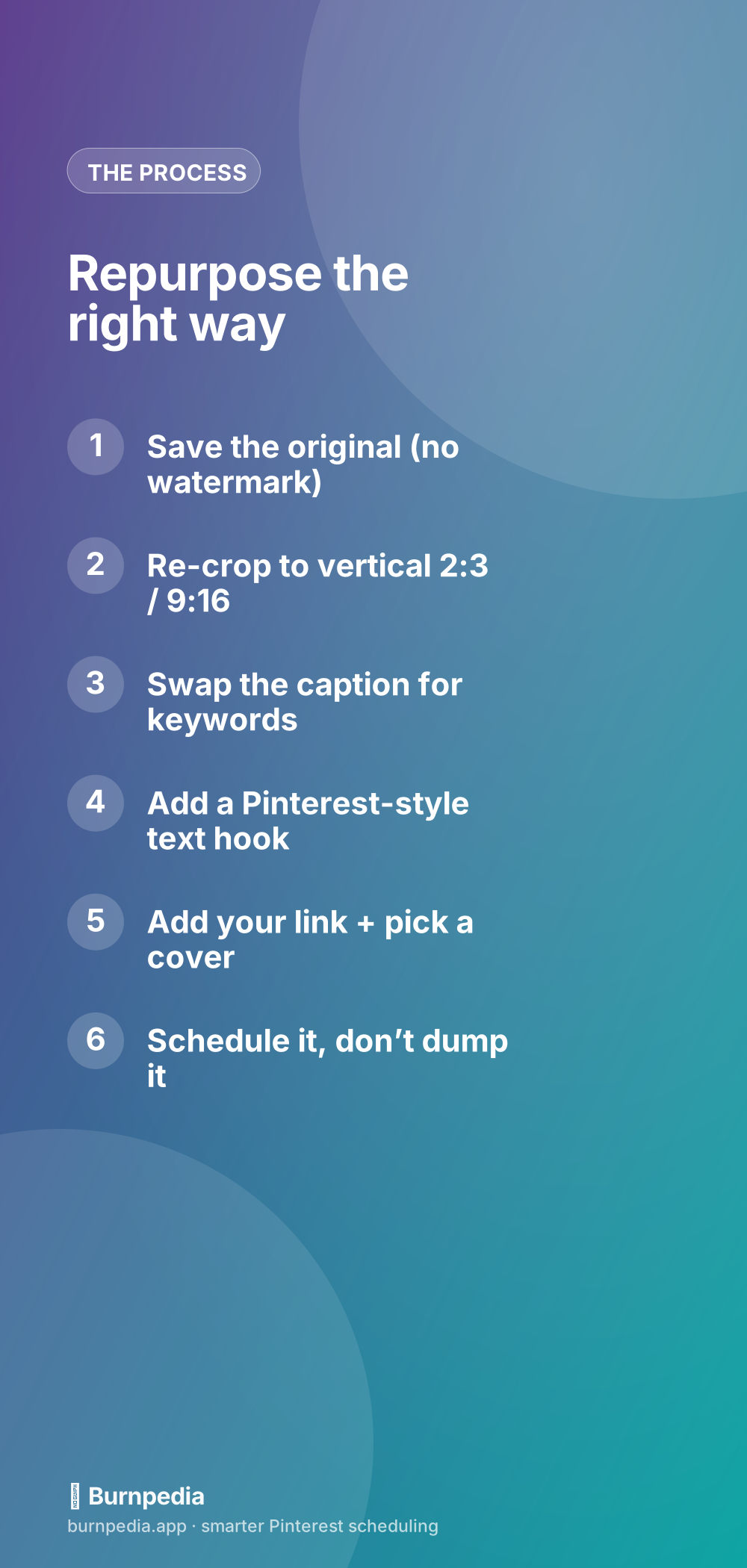
That’s the whole move: grab a clean, watermark-free copy, re-crop to vertical, rewrite the caption for search, add a hook, add your link, pick a cover, and schedule it out. You’re taking content that already died on one platform and giving it a long, traffic-driving second life on another. It’s the closest thing to free content there is, and it slots right into the bigger picture in Pinterest video marketing. Go raid your camera roll — there’s a month of Pinterest pins hiding in there. — Sadie
Written by Sadie Brooks
Hey — I’m Sadie. I grew up in a small town outside Columbus, Ohio, moved to Austin for a job I quit within a year, and somewhere in between I started a scrappy little food blog to keep myself sane.
These days I help creators, bloggers, and small U.S. business owners grow on Pinterest without turning it into a second full-time job. I write the Burnpedia blog because I genuinely love this stuff, and because I wish someone had explained it to me in plain English years ago. Pour a coffee, pull up a chair.
Try Burnpedia freeWant Pinterest to run itself?
Every tip on this blog gets easier when your Pins publish on schedule. Burnpedia batches, times, and posts them for you — start free, no credit card.
Try Burnpedia free