How to Automate Pinterest Posting in 2026 (the Safe Way, Without Getting Flagged)
Automation is the difference between Pinterest feeling like a second job and Pinterest quietly working while you sleep. Here’s how to automate it safely in 2026 — without tripping any of the wires that get accounts flagged.

Let’s talk about the thing that quietly separates the people who grow on Pinterest from the people who give up: consistency. Not talent, not luck, not a viral fluke. Just showing up, day after day, with fresh Pins. And here’s the honest truth — almost nobody can do that by hand for more than a few weeks. Life gets busy, you forget, you burn out, and your account goes quiet. Automation fixes that. It’s not cheating; it’s just refusing to let “I forgot” be the reason your traffic died.
But — and this is a big but — there’s a right way and a wrong way to automate Pinterest. Do it wrong and you can get your account flagged, throttled, or in a bad case, suspended. Do it right and Pinterest actively rewards you, because you’re giving Pinners a steady stream of fresh, useful content, which is exactly what the platform wants. This whole post is about staying firmly on the right side of that line.
If you’re brand new to the idea of scheduling at all, start with my gentler intro first — how to schedule Pins the smart way — and then come back here for the automation deep-dive. This post assumes you already believe scheduling is a good idea and you want to take it further.
First, what “automation” actually means on Pinterest
When people say “automate Pinterest,” they usually mean one of a few different things, and it helps to be precise. At the simplest level, it means scheduling: you decide what to post and when, and a tool publishes it for you so you’re not glued to the app at 9pm. One level up, it means bulk operations: uploading dozens of Pins at once and letting a tool spread them across smart time slots. And at the deepest level, it means programmatic automation: your own systems — your store, your blog, your scripts — create Pins without a human touching anything at all.
All three are legitimate. All three are safe when done through official tools. The difference is just how much you want to hand off. Most creators live happily at level one or two. Store owners and developers eventually want level three, because it turns “remember to pin the new product” into “the new product pins itself.”
The golden rule: use official access, never password-sharing bots
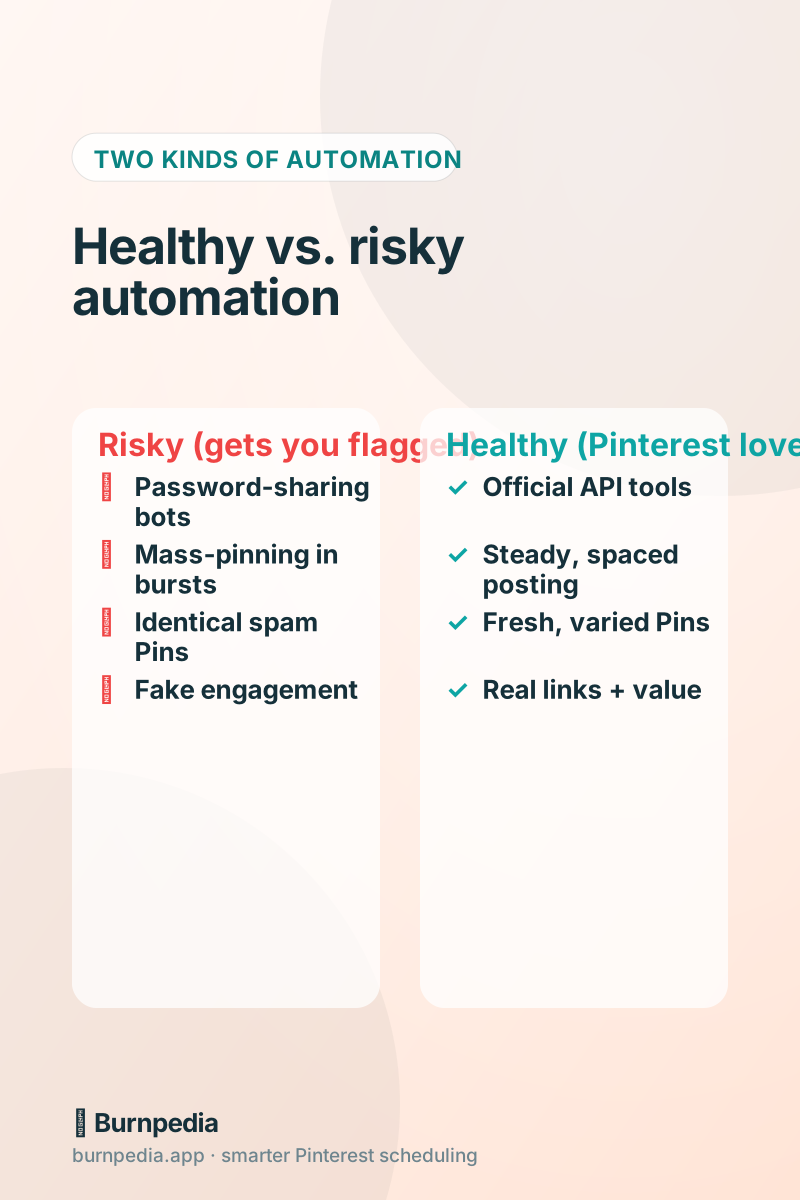
Here’s the single most important thing in this entire post, so I’m putting it in bold in my head: the tool you use must connect to Pinterest through Pinterest’s own official login and API. When you connect a reputable scheduler, you get bounced to Pinterest’s own screen, you approve access there, and the tool never sees your password. That’s the healthy path, and Pinterest is completely fine with it.
The dangerous path is any tool that asks for your Pinterest username and password directly, or a browser extension that “automates” by pretending to be you clicking around. Those are the ones that get accounts flagged, because from Pinterest’s side they look exactly like account takeover or bot behavior. If a tool ever asks for your raw Pinterest password, close the tab. A real, compliant tool never needs it.
The four habits that keep automated accounts healthy
Beyond using an official tool, there are four behavioral habits that keep an automated account in Pinterest’s good graces. None of them are hard — a good scheduler handles most of them for you — but knowing why they matter makes you a smarter automator.
- Space your Pins out. Publishing 40 Pins in one minute looks like spam. Publishing a handful spread naturally across the day looks like a healthy, active creator. Let your tool drip them out.
- Keep Pins fresh. Pinterest rewards new images. Pinning the exact same image to ten boards in a row is the oldest spam signal in the book. Vary your designs, and lean on fresh-pin tools when you can.
- Post steadily, not in panic bursts. Ten Pins a day every day beats 70 Pins on Sunday and silence all week. Steady beats spiky, always.
- Always link to real, valuable destinations. Automation that sends people to genuine content builds trust. Automation that funnels to thin or spammy pages does the opposite.
If you want the full breakdown of how much is too much, I wrote a whole piece on how often you should actually pin — the short version is “consistently, at a human pace,” and automation is how you hit that pace without living inside the app.
Level one & two: let a scheduler do the work
For most people, the answer to “how do I automate Pinterest?” is simply: use a good Pinterest scheduler and let it run. You batch a week (or a month) of Pins in one sitting, drop them onto a calendar, and the tool publishes them at the best times for your audience. That’s automation — genuine, hands-off automation — and it’s enough for the vast majority of creators and small businesses.
The features that matter here are best-time posting (so your Pins land when your people are actually scrolling), bulk upload (so batching a month doesn’t take all day), and evergreen rotation (so your best Pins come back as drafts you OK over time). If you want help choosing a tool that does all three, I ranked the options in my honest scheduler comparison. The point is: pick one, set it up once, and stop pinning manually forever.
Level three: true automation with an API
Now for the fun part, if you’re a little technical or you run a store. The deepest form of automation is connecting your own systems directly to Pinterest through an API, so Pins get created without you even opening a scheduler. Publish a new blog post? A Pin appears. Add a product to your store? A Pin appears. You never touch it.
That’s exactly what the Burnpedia API is for, and it’s the safest way to do programmatic automation because every call runs through the same compliant, official pipeline as the app — with built-in rate limits that keep you inside Pinterest’s own boundaries. I wrote a complete, friendly walkthrough with real code here: the Burnpedia Pinterest API guide. If “my store pins its own products” sounds like magic, that post shows you it’s about ten lines of code.
The beautiful thing about API-level automation is the guardrails. A well-designed API caps how fast you can post, so even if your code has a bug and tries to fire a thousand Pins, the API politely slows it down instead of getting your account flagged. That’s automation with a seatbelt — which is exactly what you want when a robot is acting on your behalf.
How to scale up without spooking the algorithm
Whichever level you choose, ramp up gradually. If your account has been posting two Pins a day and you suddenly automate thirty, that jump looks unnatural. Step it up over a couple of weeks — five a day, then ten, then fifteen — and watch your analytics as you go. If impressions and saves keep climbing, you’re golden. If they suddenly crater, ease off; you’ve pushed past what your account and audience are ready for.
And genuinely watch the numbers, not just the vanity ones. Saves and outbound clicks tell you whether your automated Pins are actually landing with humans. If you’re automating a firehose of Pins that nobody saves, you’re just making noise — automate quality, not just quantity.
A simple, safe automation plan you can start this week
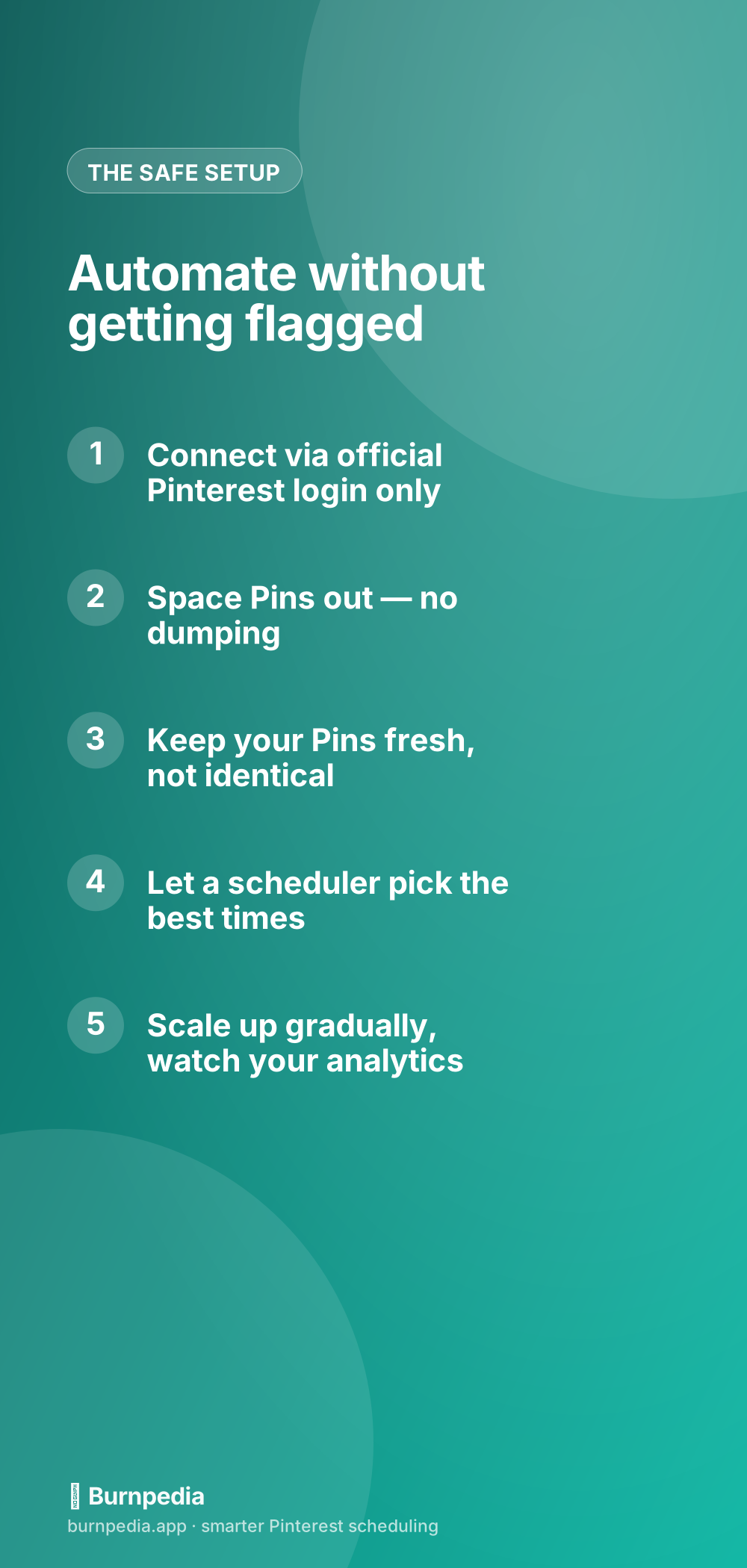
Here’s the plan I’d give a friend. One: connect your account to a reputable, official-login scheduler. Two: batch two weeks of fresh Pins in one sitting and let the tool schedule them at the best times. Three: turn on evergreen rotation for your best performers so they come back as drafts you OK. Four: check your analytics once a week and adjust. That’s it — that’s a fully automated Pinterest presence, and it’s completely safe.
If, down the road, you want your store or blog to create Pins on its own, that’s when you graduate to the API. But you don’t have to start there. Start with the scheduler, get comfortable, and let it prove to you how much time automation gives back.
So no, automating Pinterest isn’t lazy and it isn’t risky — when you do it through official tools at a human pace, it’s just smart. It’s the difference between Pinterest being a chore you dread and a quiet little traffic machine humming away in the background. Set it up once, keep your Pins fresh, watch your numbers, and go live your life. That’s the whole point. — Sadie
Written by Sadie Brooks
Hey — I’m Sadie. I grew up in a small town outside Columbus, Ohio, moved to Austin for a job I quit within a year, and somewhere in between I started a scrappy little food blog to keep myself sane.
These days I help creators, bloggers, and small U.S. business owners grow on Pinterest without turning it into a second full-time job. I write the Burnpedia blog because I genuinely love this stuff, and because I wish someone had explained it to me in plain English years ago. Pour a coffee, pull up a chair.
Try Burnpedia freeWant Pinterest to run itself?
Every tip on this blog gets easier when your Pins publish on schedule. Burnpedia batches, times, and posts them for you — start free, no credit card.
Try Burnpedia free